


Mirror
4.411.00 Reviews
App Specs
- Version
- 3.1
- Updated On
- License
- Free
- Downloads
- 500,000+
- Developer
- Mabixa
- Categories
- Beauty
- Platform
- Android, iOS
Screenshots
 Analysis by AppCompare
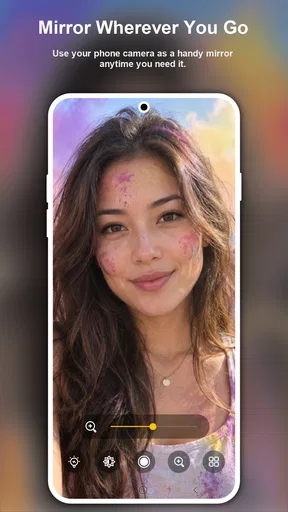
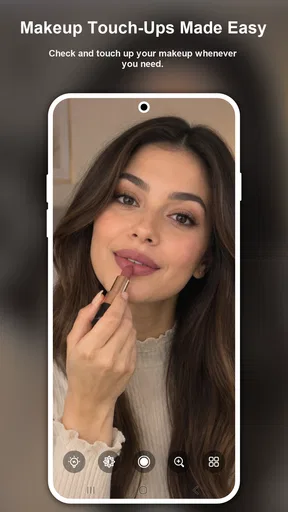
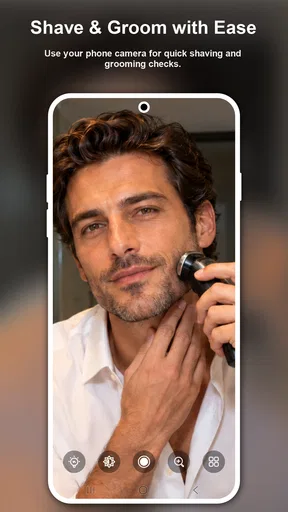
When a quick check is all you need, a phone can be more convenient than searching for a wall mirror. Mirror is a beauty app from Mabixa that turns the phone screen into a way to inspect your appearance, with the practical aim of helping when you are putting on makeup or shaving. I see its appeal in the small gaps of the day: checking a detail before heading out, tidying up after lunch, or getting a closer look when the nearest real mirror is occupied.
It is free to download, has an Everyone age rating, and offers in-app purchases priced at $3.99 per item. The app has a 4.4 average from around 4.3 thousand ratings and over 500 thousand installs. Those figures suggest it has found an audience, but the more useful question is whether a camera-based reflection fits the way you actually get ready. For me, it works best as a portable backup, not as a full replacement for a proper mirror.
First Impressions Matter
When I first downloaded the app, I was curious about how much a virtual mirror could really do. As soon as I opened it, I was greeted with a sleek interface that was as easy to use as my bathroom mirror—maybe even easier. The app uses your phone's front camera to give you a reflection of yourself, but it’s not just any reflection; it’s a reflection with perks.
Where a Phone Mirror Can Get Stuck
The basic idea is simple, but the result still depends on the phone being ready to act like a mirror. A dark screen, a smudged front camera, or a phone held at an awkward angle can make a quick check less useful. I would start by wiping the camera area and holding the device at a comfortable distance rather than treating the screen like a tiny magnifying glass from the outset.
This kind of app is most helpful for checking placement and overall appearance, such as whether a lipstick edge looks neat or a shave needs another pass. It is less suited to judging fine color accurately. A phone screen and camera are not the same as looking at your face in daylight, so I would use the reflection to spot obvious details, then step into natural light before making a decision that depends on subtle shades.
Features You'll Love
The first thing I noticed was the zoom function. Have you ever tried to examine something closely in a regular mirror and wished you could zoom in? Well, now you can. This feature is particularly handy for makeup application or checking out that tiny rogue hair.
Zoom is most useful when I already know where to look: an eyeliner corner, a missed patch while shaving, or a small spot that is hard to inspect at arm’s length. I would avoid keeping the image enlarged for the whole routine, though. At high magnification, it is easy to lose perspective and spend too long fixing a detail that is barely noticeable at normal viewing distance. A good workflow is to check the overall face first, zoom in for one task, then return to the wider view before calling it finished.
Worth Reading Before You Choose

Baby Panda World Brings Quick Play to Modern Phones, but Its Game Library Feels Busy

ESPN’s Live Game View Makes Following Close Games Easier

QuizzLand Review: A Good Fit for Short Trivia Breaks, Not Every Player

Basketball Stars: Multiplayer Is Fast, but Can It Recover When Matches Go Wrong?

WEBTOON Turns Phone Updates Into a Better Reading Routine

Link to Windows Runs on Shared Habits, Not Social Feeds
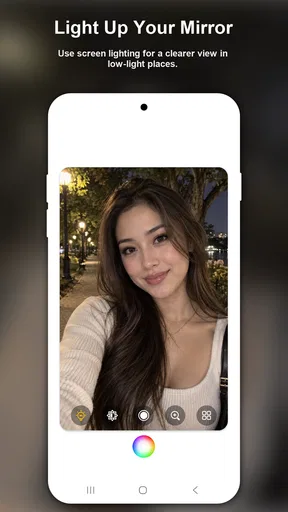
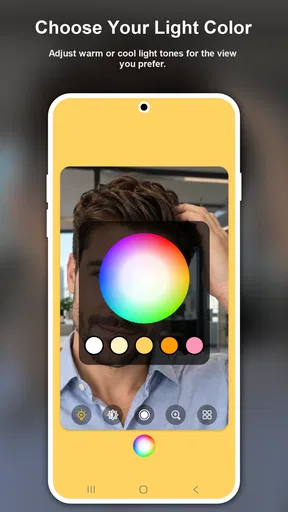
Another highlight is the brightness control. Lighting can make or break your reflection in a mirror, and the app lets you adjust the brightness to mimic different lighting scenarios. Whether you’re getting ready for a candlelit dinner or a bright outdoor event, you can see how you’ll look in advance.
Brightness adjustment can make the image easier to see, but it should not be mistaken for a true change in the room’s lighting. If you are getting ready for an outdoor event, checking your face beside a window is still a better final test than relying only on a brighter screen. I find the control most practical when a room is dim and I need to see what I am doing, rather than as a guarantee that makeup will look identical under every lamp.
Let’s not forget the freeze frame feature. Sometimes you just need to pause and take a closer look, and this feature lets you do just that. You can freeze the image on the screen, giving you time to inspect every detail.
A paused view is handy when you need both hands free for a moment or want to compare a detail without continually adjusting your grip. The trade-off is that a frozen image cannot show how your face looks when you move, and it can become outdated as soon as you change position or the light shifts. I would use it as a temporary inspection aid, then return to the live view for a final check.
Usability and Performance
Using the Mirror app is as straightforward as it gets. It doesn’t bombard you with unnecessary features or complicated settings. The app is smooth and responsive, with minimal lag, which is essential when you’re trying to get a real-time reflection.
If the image does not appear or feels difficult to use, I would check the simple things first: make sure the front of the phone is not covered, clean the camera area, and reopen the app if the display seems stuck. If the phone itself is slow or the room is poorly lit, those conditions can affect the experience too. A mirror app cannot improve a blocked camera or create more useful light in the room.
I’ve been using it regularly for a few weeks now, and it’s been a game-changer for my morning routine. The app has never crashed or frozen on me, which is more than I can say for some other apps on my phone.
For an everyday routine, the most useful approach is to keep the phone steady and use the controls only when they solve a specific problem. For example, before leaving home, I can use the normal view to check my overall appearance, zoom briefly to inspect a small area, and then switch back to the live image. That sequence is quicker than repeatedly changing settings without a clear reason.
Setup Checks and a Reliable Routine
The app’s current version is 3.1, and it supports devices running Android 7.0 or later. Before relying on it away from home, I would open it once in a familiar, well-lit place and learn where the basic controls are. That small test helps avoid fumbling with the phone when you are in a hurry, and it gives you a chance to find a comfortable angle for holding it.
A useful everyday scenario is getting ready in a shared bathroom when someone else needs the wall mirror. I can step aside with my phone, use the live reflection for a quick check, and reserve zoom for a detail such as a stray hair or makeup edge. If the room light is unflattering, I can adjust brightness to see more clearly, but I would still make the final color check by a window if the result matters.
For shaving, the same approach works best in short passes: use the live image to orient yourself, inspect a small area more closely, then move the phone back to see the overall result. I would not shave while watching only a frozen image or while holding the phone in a position that makes the razor awkward to control. A real bathroom mirror is the safer, more comfortable choice when both hands and a stable view matter.
When Another Option Makes More Sense
A physical mirror remains better for a full-face view, hands-free grooming, and checking how your appearance looks from different angles. A front-camera mirror is more portable and can help when no mirror is nearby, but the phone’s screen is a limited viewing area and the camera’s perspective may feel different from a normal reflection. I would choose this app for a quick, close inspection, not for replacing the main mirror in a daily makeup setup.
It is also worth separating a mirror check from a photo. A live reflection is convenient for immediate grooming, while a selfie can help you see how a look appears in a captured image. Neither is a perfect substitute for how other people see you in person, and a camera view can make small details feel more prominent than they are. If you are preparing for a video call, a brief check can help with obvious adjustments, but the camera you will use for the call is the more relevant final reference.
Who Is It For?
If you’re someone who loves checking their appearance on the go, this app is perfect for you. It's also a must-have for makeup enthusiasts who need to apply cosmetics with precision. Plus, if you’re often on video calls, the app can give you a quick check to make sure you’re looking your best before you go live.
I would especially recommend it to people who want a lightweight backup for travel, work, or a busy household, and to anyone who often needs a close look at one small grooming detail. Someone who depends on accurate color matching, needs a broad hands-free view, or prefers not to use a phone while shaving may be happier with a physical mirror. The app is also not necessary if a good mirror is always within reach; its value comes from convenience, not from making every ordinary mirror obsolete.
The app is free to download, but it does offer in-app purchases for some additional features. I found the free version to be quite sufficient, but if you want to unlock extra functions like different mirror frames or advanced lighting settings, the options are there.
Because those extras are optional purchases, I would try the basic experience before spending anything. The core question is whether a phone reflection suits your routine; a paid add-on only makes sense if it addresses a specific need you have. The app is developed by Mabixa, and its beauty focus is clear in the everyday grooming uses that make the most sense here.
Final Thoughts
To sum it up, Mirror is an app that does exactly what it promises and a bit more. It turns your smartphone into a versatile mirror, complete with zoom, lighting adjustments, and freeze frame capabilities. It’s easy to use, performs well, and has a few neat tricks up its sleeve. Whether you’re a beauty guru or just someone who likes to look their best, this app is worth a spot on your home screen.
My practical verdict is that it earns its place as a backup for quick checks, especially when portability matters more than a large, hands-free reflection. Keep the camera area clean, use zoom for targeted inspection rather than judging the whole look, and treat brightness as help for visibility rather than a faithful preview of every lighting condition. Those habits make its strengths more useful and its limitations easier to manage.
So, if you’re tired of squinting into tiny mirrors or struggling with bad lighting, give the Mirror app a try. You might just find it becomes your new favorite way to see yourself.
Pros
- Easy-to-use interface for quick access.
- High-quality reflection with minimal lag.
- Adjustable brightness for different settings.
- Zoom feature enhances usability.
- Lightweight app with minimal storage use.
Cons
- Contains ads which can be intrusive.
- Lacks additional features like filters.
- No option for screen recording.
- Limited to front camera only.
- Occasional crashes on older devices.
FAQs for Mirror
What is Mirror and how does it work?
Mirror is a fitness app that provides a comprehensive workout experience at home. It transforms any room into a personal fitness studio using an interactive device that streams live and on-demand classes. Users can access a variety of workouts from yoga to strength training, all while receiving real-time feedback and motivation from instructors.
Do I need any special equipment to use Mirror?
To use Mirror, you'll need the Mirror device itself, which is a sleek, full-length, interactive mirror. While no additional equipment is required for many workouts, some classes may suggest weights, resistance bands, or a yoga mat to enhance your exercise routine. The app will guide you on what’s needed for each session.
Is Mirror suitable for beginners?
Yes, Mirror is designed to cater to all fitness levels, including beginners. The app offers a wide range of classes with varying intensity levels, allowing users to start with basic workouts and gradually progress to more challenging sessions. Personalization options ensure that users can tailor their fitness journey to match their individual goals.
Can Mirror be used by multiple people in the same household?
Mirror supports multiple user profiles, making it ideal for households with multiple users. Each user can create a personalized profile, track their progress, and receive customized workout recommendations. This feature allows everyone in the family to enjoy their own unique fitness experience without interfering with others’ routines.
What are the subscription costs associated with Mirror?
Mirror requires a monthly subscription fee in addition to the cost of the device itself. The subscription grants access to an extensive library of live and on-demand classes. Pricing details can vary, so it's advisable to check the official website for the latest subscription rates and any available promotions.


